Every Pixoot feature, one screen at a time. Each section plays a live animated showcase — watch what to do, then read the exact steps below it.
- TAP / CLICK move & interact
- W A S D keyboard movement
- 1–8 cast glyphs
- One finger plays everything — desktop keys optional
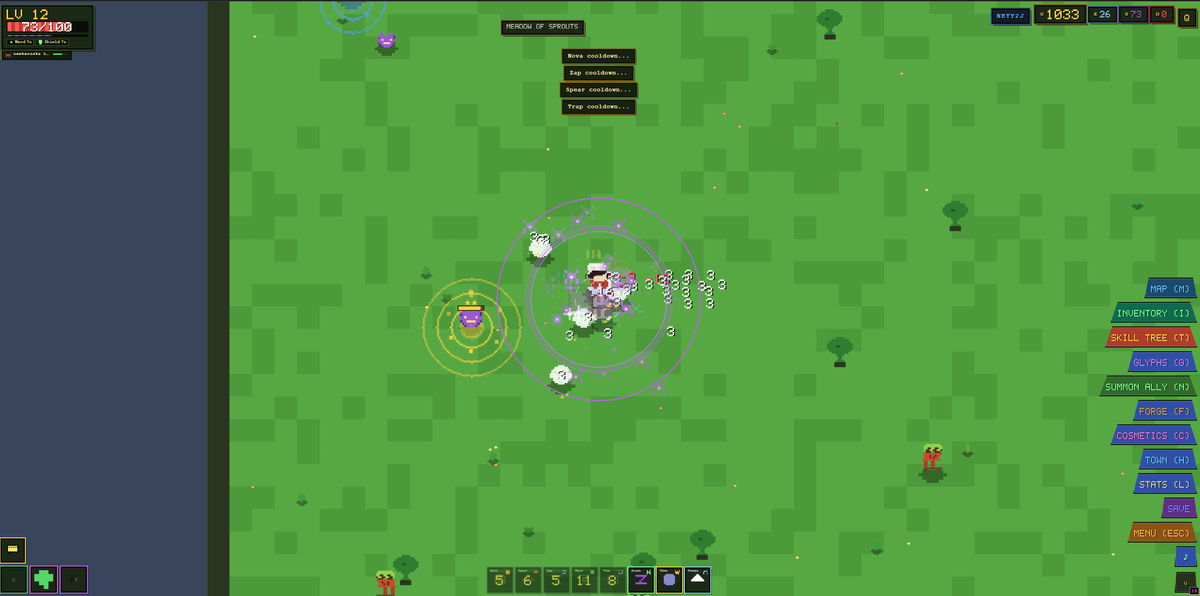
Move with tap or click
Your hero walks wherever you point — no path clicking needed twice.
- Tap or click the ground to walk there (A* pathing finds the way).
- Tap an enemy to walk over and engage it.
- Tap yourself to stand still.
- Tap a floating item label to walk over and pick it up.
- Identical for mouse and finger — the entire game is playable with one finger.
Move with WASD
Prefer the keyboard? Hold the arrow keys instead.
- Hold W A S D or the arrow keys to move in that direction.
- Keyboard movement cancels your current tap destination instantly.
- Mix freely: tap across the map, then steer with keys at any moment.
Combat — you attack automatically
Walk close and your hero swings on its own. No attack button exists.
- Stand within 1.5 tiles (24u) of an enemy — your hero auto-swings every 0.55s.
- Melee heroes slash; wands and bows fire projectiles instead.
- Orange CRIT! numbers deal ×1.5 damage (base 5% chance, +Luck / gear).
- Enemies chase you inside their aggro range and fight back — watch your HP bar.
- Special floats: DODGE!, BLOCKED and SHIELD DOWN tell you why damage was skipped.
Enemies, ranks & bosses
160 enemy types across twelve lands — but only a few threat levels to learn.
- Ranks scale HP & XP: Veteran 1.25× · Elite 1.55× · Ancient 1.9× · Colossal 2.3×.
- Champions (10% spawn, blue ring, 2.5× HP) arrive in packs of 2–3.
- Rares (4%, gold ring, 4× HP) arrive in packs of 4–6 — huge rewards.
- Kill 24 enemies on a map to wake its BOSS — banner announces it.
- The boss drops the portal to the next land; re-entering a cleared map re-arms it.
- Non-hostile wildlife wanders the twelve lands: 36 critters (walkers, snakes, fliers), 3 per land — cosmetic only, and Haven has none.
Loot, gold & rarities
Kills burst into gold and gear. Coins fly to you; gear waits for a tap.
- Gold & currencies are magnet-pulled from 2.6 tiles and auto-collected.
- Gear & potions stay on the ground with a label — tap the label or walk over it.
- Five rarities: common → uncommon → rare → epic → legendary.
- Rare+ drops are unidentified (yellow ?) 15% of the time — identify them to reveal a hidden bonus.
- Nothing on the ground ever expires — loot at your own pace.
Inventory & equipping
Three slots: WEAPON, ARMOR, TRINKET. Tap to look, double-tap to wear.
- Open with I or B (or the INVENTORY dock button).
- Tabs: ALL · WEAPONS · ARMOR · TRINKETS · POTIONS · SCROLLS · MAPS + search — plain text, or properties: tier:5 · rarity:legendary · dmg>=20 · equipped.
- Tap an item to select it and see its stats; double-tap gear to equip (swaps with current).
- Double-tap a potion to drink it, double-tap a scroll to use it.
- Detail view has DROP to throw an item on the ground (party members can pick it up).
- Equipped gear shows green bonus numbers from Forge upgrades.
Potions & scrolls
23 potions and 33 scrolls — put your favourites on Q, E and R.
- In a potion's detail: QUICK [Q] or QUICK [E] assigns it to that slot; then press Q/E to drink.
- The first Health Potion you find auto-fills slot E if it is empty.
- Scrolls use slot R (QUICK USE in their detail) — fireball, haste, teleport, escape…
- Active buffs show as icons with countdowns above the dock.
- The Apothecary and Mystic stalls in Haven sell more of both.
XP & levelling
Kill, learn, grow. Every level hands you a skill point and a new glyph.
- XP comes from kills, quests and Tomes of Wisdom. Needed: floor(25 × level^1.35).
- Each level: +1 skill point, a random glyph unlocked, and 50% heal.
- Level cap is 200; Scholar's Eye buffs grant +40% XP while active.
- Level-up auto-saves your hero.
The skill tree
A Path-of-Exile style web of passives: 189 nodes, 8 arms, 8 keystones.
- Open with T (or the SKILL TREE dock button).
- Tap a node to select and inspect it; double-tap to allocate 1 point.
- You can only allocate nodes next to an already-lit node (or the Origin).
- Double-tap your own node to refund it — refund costs grow: 50 + 3 × nodes gold.
- Keystones rewrite the build (+35% damage & −10% HP, pierce, ward, chains…).
- Glyph Arts (Conduit, Surge, Resonance, Aegis, Ruin) improve your spells — more damage, shorter cooldowns, wider areas.
- RESET ALL button refunds everything for gold; search + pinch-zoom for navigation.
Glyphs — equip your spells
205 glyphs live in the Glyph Book. Eight ride on your ability bar — five regular slots and three draw slots.
- Open the book with G. Five glyphs are unlocked from the start: NOVA, SPEAR, ZAP, WARD, TRAP.
- Open a glyph → press SLOT 1…8 to equip it (swaps with whatever was there). SLOTS 6, 7 and 8 are DRAW SLOTS — each one is cast by its own hand-drawn gesture.
- The ability bar mirrors your 8 slots — cast with keys 1–8 or by tapping the bar buttons. Every slot shows the glyph name top-left and the shape you draw to cast it top-right (empty slots show their number instead of a name).
- Casts target the nearest enemy within 200u and share the glyph's cooldown (sweep + number on the slot).
- Level up to unlock more glyphs — the first three unlocks land in slots 6, 7 and 8 one by one (205 total), so a new glyph is always ready to draw.
Draw a glyph to cast
The signature move: drag a shape on the ground and release to unleash it.
- Press and drag on the ground — a stroke longer than 57px becomes a glyph.
- Release to cast. The eight recognized shapes are ◯ circle · ▢ square · △ triangle · Z · U · N · W · ∩ — shorter drags (22px) count as taps, and an unknown shape shows “Unrecognized glyph”.
- Each shape casts the glyph equipped in its slot: ◯ → slot 1 (NOVA by default) · △ → slot 2 (SPEAR) · Z → slot 3 (ZAP) · ▢ → slot 4 (WARD) · U → slot 5 (TRAP) · N → slot 6 · W → slot 7 · upside-down U (∩) → slot 8 — an empty slot falls back to its base ability, and keys 1–8 or bar taps do exactly the same.
Upgrade glyphs
Spend skill points to make spells stronger — up to level 5.
- In the Glyph Book select a glyph → UPGRADE (n SP).
- Cost by tier: Common 1–2 SP … Legendary 3–5 SP per level; max level 5.
- Stats scale by the glyph's perLevel values (shown live on the card).
- RESET returns all points for gold (50 + 3 × levels); locked glyphs show LOCKED until unlocked.
HUD & panels
Everything is one key away. The dock shows them too.
- I/B inventory · T skill tree · C cosmetics · L stats · G glyph book.
- J quest log · M minimap · H town · F forge · N summon ally.
- ESC closes whatever is open — pressed with nothing open it saves & returns to menu.
- SAVE button writes immediately; COSMETICS opens the style panel; the dock can be collapsed.
- Top bar: level, HP, XP, map name/timer, currencies G E S O, room code, quest button.
The minimap
Press M for the strategic view — fog, friends and portals.
- M or the MAP button toggles it.
- Dots: red enemies · blue champions · gold rares · orange boss.
- Violet portal = forward · amber = back · pulsing = pending boss.
- Cyan = co-op party members; white arrow = you.
- Fog of war hides unexplored ground; shrines, chests (Treasure Sense) and bounties get their own icons.
Your ally companion
A little warrior fights beside you — press N (or type the word).
- Press N to summon your ally; it follows and attacks on its own.
- Easter egg: type “ally” within 2 seconds to summon it too.
- Glyph effects can heal, haste and shield your ally.
- Ally is client-local — in co-op it is visible to you only.
Quests & bounties
Three kinds of goals pay you gold, XP and skill points.
- Open the journal with J; the quest board lives in Haven.
- Objective types: KILL and BOSS — a VISIT type exists in the engine but no quest uses it.
- A starter chain (First Steps → Into the Wild → Forest Bound) begins automatically.
- Up to 3 active quests; once one-time quests are done, repeatables and 36 boss bounties keep paying.
- Rewards claim automatically when the objective completes.
Death & respawn
Dying is a speed bump, not an end — one tap and you are back.
- On death the defeat overlay appears → tap RESPAWN.
- Respawn = full HP at your spawn with 1.5s invulnerability.
- Phoenix legendary weapon and Phoenix Ward / Immortality glyphs revive you automatically (once per run / cooldown).
- Immortal Coat locks your HP at 1 instead of dying.
- In co-op, RESPAWN tells the server — the world state is shared.
- Deaths are counted on your character sheet (they never lose your items).
Haven — the town
A safe 84×84 map with merchants, travel and quests. No enemies inside.
- Press H (TOWN button) to teleport in.
- Waystone: tap it to fast-travel to any conquered map.
- Quest board & Map device: tap their structures to open them.
- Six stalls: Weapons · Armor · Trinkets · Potions · Maps · Scrolls.
- Portal (north) sends you back to the adventure map you came from.
Merchants & currencies
Spend what you hoard — four currencies, seven kinds of sellers.
- Tap a merchant (fixed stall or wandering trader) to open the trade window.
- Currencies: G gold · E essence · S shards · O orbs (top bar).
- Traders roam the world with a fixed offer set until they leave; up to 3 alive at once.
- In co-op, purchases are server-validated — prices and currency are checked.
- You cannot sell items — DROP them or dismantle at the Forge for essence/shards.
The Forge
Turn spare loot into stronger gear.
- Press F (FORGE button) to open it.
- UPGRADE +1: pay gold to grow an item's green bonus — damage/HP keeps stacking.
- DISMANTLE: break unwanted gear into essence & shards.
- Identify gear with Scrolls of Identification/Revelation or identify glyphs; the enchant glyph even raises an item's rarity tier.
Random events & shrines
The world never sits still — banners drop, overlays glow, timers tick.
- Solo runs fire 11 event types every 90–180s; co-op runs the 7 server-authoritative ones.
- Events: Treasure Golem · Elite Pack · Gold Rush · Blood Moon · Portal Storm · Shrine · Assassin (+ solo: Meteor Shower, Healing Rain, Monster Bounty, Chrono Shift).
- Shrines: tap anywhere while near one to claim +25% damage · +25% speed · +50% gold find · +30% crit.
- Blood Moon paints the screen red; Gold Rush multiplies coin value ×2.
- Events feed quests — shrine claims and boss bounty progress are tracked.
Co-op rooms
Up to 4 heroes, one shared world — with a 6-character code.
- CO-OP tab → type a 6-char code or press CREATE to make one.
- Tick Public room to list it in the live lobby, or keep it private (code-only).
- JOIN enters by code; the server is authoritative for damage, XP, loot, bosses and portals.
- Party HUD shows teammates' HP, level and map — with a JOIN button to teleport to them.
- Busy server → an inline QUEUE panel shows your position and wait estimate.
- Portal invites are accepted with E; dropped gear can be picked up by anyone in the room.
- The leader starts a READY CHECK — everyone answers I'M READY or NOT NOW within 30 s, and the leader can't start until all are ready.
- Tap a nickname to open the name card → WHISPER · INVITE TO GROUP · ADD FRIEND.
- Menu → CHAT → FRIENDS lists requests, online dots and nicknames you can add.
- Co-op differences: glyph damage lands on the shared world (server-resolved, heals re-applied), ally is local, legendary weapon procs are solo-only.
Saves & accounts
Play as a guest forever, or sign in to sync across devices.
- Solo saves to localStorage and auto-saves every 60s (plus on level-up, boss, death, portal).
- Logged in → cloud sync writes 10s after changes and flushes when you close the tab.
- Log in / Sign up tab: email+password (verified) or Google sign-in.
- Conflicts between devices show a merge dialog — never a silent overwrite.
- Co-op heroes persist server-side by token; one live session per account.
- Delete Account (settings) removes everything.
Cosmetics
Wings, auras, hats, pets, trails, halos, capes and gear skins.
- Press the COSMETICS button in the dock (C); the character sheet lives under L.
- Tabs: WINGS · AURA · HAT · PET · TRAIL · HALO · CAPE · GEAR.
- Switch target between PLAYER and ALLY.
- Cosmetics are cosmetic only — zero combat effect, visible in co-op.
Achievements & titles
101 achievements, 47 titles — and the title is the part other players see.
- The dock button ACHIEVEMENTS [Y] opens the panel — press Y to toggle it while playing (it does nothing in the main menu).
- 101 achievements in 6 categories — Combat · Adventure · Progression · Economy · Challenges · Multiplayer — across four tiers worth Bronze 10 · Silver 25 · Gold 50 · Platinum 100 points.
- 8 of them are hidden until earned — the locked row just reads Secret Achievement.
- A toast announces every unlock as it happens; progress is counted from kills, maps, quests, chests, crafting, gold, trader purchases, deaths and co-op runs.
- 47 achievements grant a title, and every Gold and Platinum one does. Equip yours from the Titles tab.
- Your title is printed as [Title] in front of your name in chat, the friends list, the party roster and group invites — it is not drawn above your hero in the world.
Controls cheat sheet
The whole keyboard, at a glance. Tap keys are also dock buttons.
- Every key has a matching touch button in the dock — keyboard is optional everywhere.
- If a panel is open, keys act on the panel first; ESC closes topmost-first.
| KEY / ACTION | WHAT IT DOES |
|---|---|
| W A S D / Arrows | Move (cancels tap destination) |
| Tap / click ground | Walk there · tap enemy to engage |
| Drag on ground | Draw a glyph shape → cast on release |
| 1 – 8 | Cast equipped glyph / ability in that slot (6-8 are draw slots) |
| Q · E · R | Drink Q-potion · E-potion · use scroll |
| I or B | Inventory (equip / drink / drop) |
| T | Skill tree (tap select, double-tap allocate) |
| C | Cosmetics (was: character sheet) |
| L | Character stats sheet |
| G | Glyph Book (equip & upgrade spells) |
| J | Quest log |
| M | Minimap |
| H | Teleport to Haven (town) |
| F | Forge (upgrade / dismantle) |
| N | Summon ally (or type “ally”) |
| Y | Achievements & titles (toggle) |
| SAVE · MAP [M] · COSMETICS [C] | Dock buttons mirror every key — SAVE has no shortcut |
| ESC | Close panel → Save & return to menu |